

Ugreen DXP2800 GT vs DXP4800 GT: How much NAS do you really need when replacing your costly cloud storage?
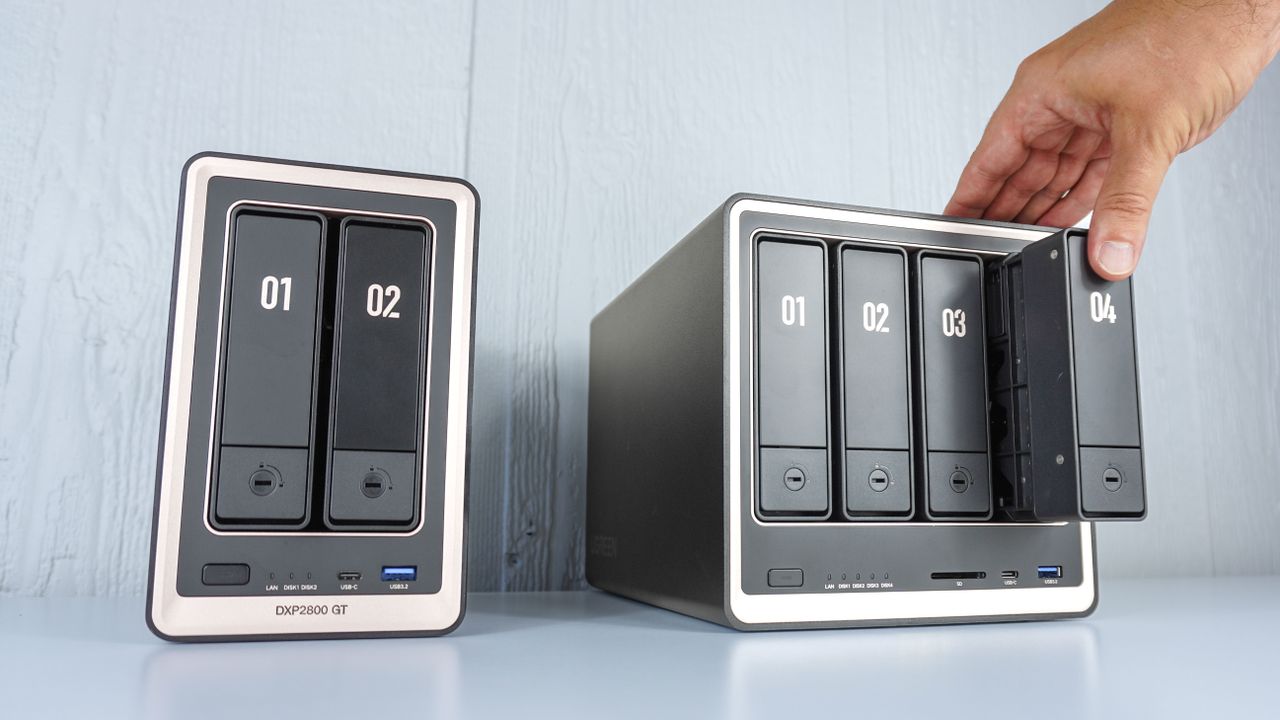
Storing your files in the cloud is convenient until it isn’t. That’s why more and more people are turning to Network Attached Storage (NAS) devices to keep their data local instead.
Whether it’s family photos and videos, a massive library of ripped DVDs and Blu-rays, or critical work files, keeping your data at home has serious perks. Plus, just like with the best cloud storage, you can still access your personal files from anywhere with an internet connection.
While NAS devices used to feel intimidating to set up and configure, Ugreen has done an impressive job of making them accessible to everyday users. Even if you aren't particularly tech-savvy, backing up your files locally and accessing them across your computer and smartphone is very straightforward.
After trying out Ugreen’s consumer-friendly DH4300 Plus and its flagship iDX6011 Pro — which is capable of running local AI models — the company sent over two of its latest enthusiast-focused devices: the DXP2800 GT and DXP4800 GT. If you’re trying to decide between the two, here is everything you need to know to pick the right enclosure for your storage needs and workflow.
Ugreen DXP2800 GT vs DXP4800 GT: Specs
|
DXP2800 GT |
DXP4800 GT |
|
|---|---|---|
|
CPU |
AMD Ryzen Embedded R2514 |
AMD Ryzen Embedded R2514 |
|
RAM |
8GB DDR4 (Expandable to 64GB) |
8GB DDR4 (Expandable to 64GB) |
|
Flash Memory |
64GB eMMC |
64GB eMMC |
|
OS |
UGOS Pro |
UGOS Pro |
|
Drive Bays |
2 x SATA (3.5"/2.5") |
4 x SATA (3.5"/2.5") |
|
SSD Slots |
2 x M.2 |
2 x M.2 |
|
Max Storage |
80TB (2x 32TB + 2x 8TB) |
144TB (4x 32TB + 2x 8TB) |
|
RAID |
JBOD, Basic, RAID 0, RAID 1 |
JBOD, Basic, RAID 0, 1, 5, 6, 10 |
|
Ports |
1 x USB-C, 1 x USB-A (front), 1 x 10 GbE, HDMI (4K@60Hz), 1 x USB-A 3.2, 2 x USB-A 2.0 (rear) |
SD 3.0 Card Reader, 1 x USB-C, 1 x USB-A (front), 2 x 10 GbE, HDMI (4K@60Hz), 1 x USB-A 3.2, 2 x USB-A 2.0 (rear) |
|
Dimensions |
9.13 × 4.31 × 7.02 in |
10.10 × 7.00 × 7.00 in |
|
Power |
~18.1W (idle) / ~42.3W (active) |
~22W (idle) / ~60W (active) |
|
Warranty |
2 years |
2 years |
Ugreen DXP2800 GT vs DXP4800 GT: Pricing
The two-bay Ugreen DXP2800 GT costs $509 while the four-bay Ugreen DXP4800 GT costs $699. Keep in mind that these are both diskless enclosures — the 64GB of built-in flash memory is strictly reserved for the UGOS Pro operating system, so you will need to budget separately for hard drives or SSDs.
Additionally, both models are compatible with Ugreen’s US3000 mini UPS. This uninterruptible power supply provides protection for your NAS in the event of a power outage or surge via a battery backup that gives you enough time to safely power down your system.
Ugreen DXP2800 GT vs DXP4800 GT: Design
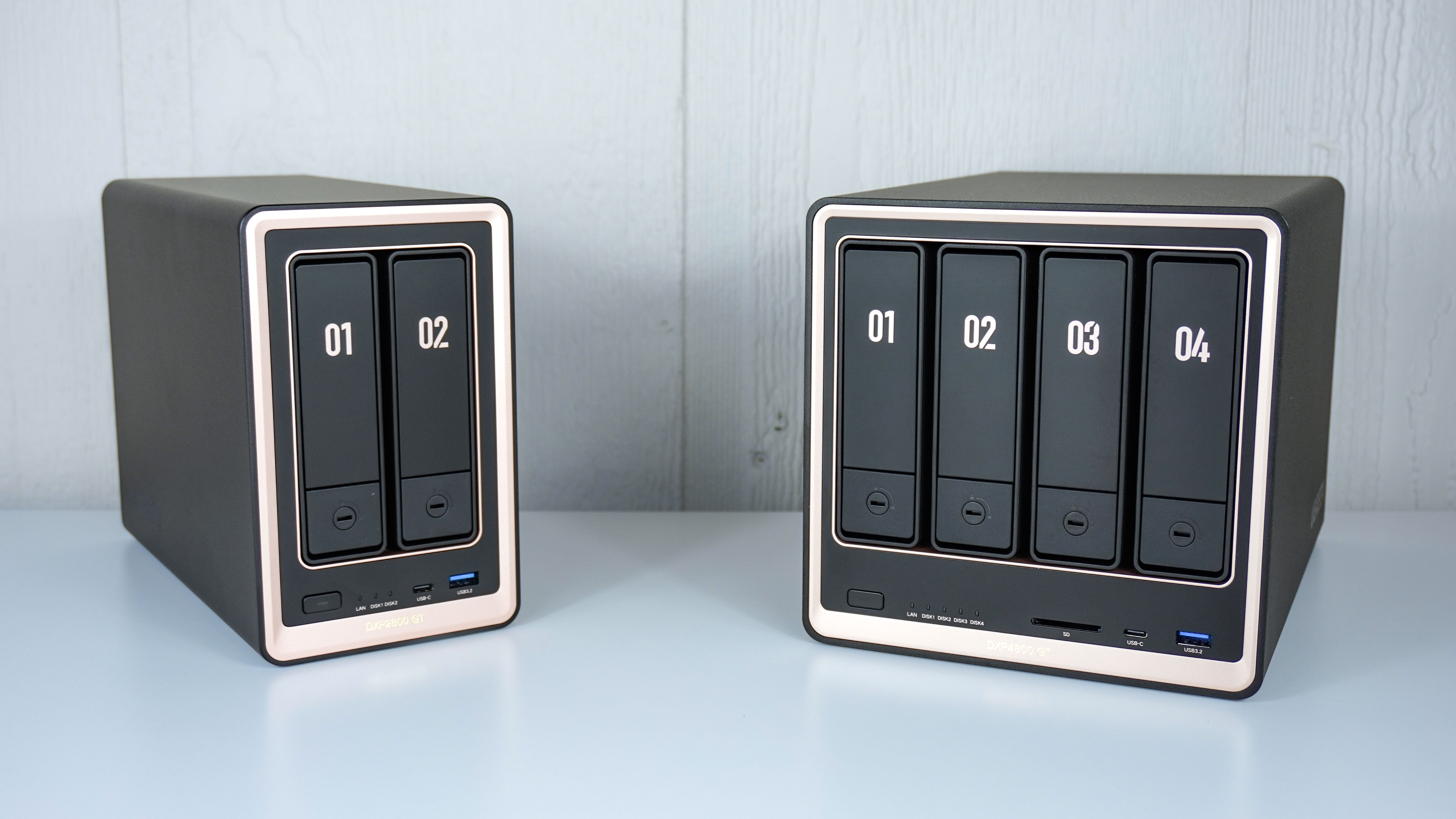
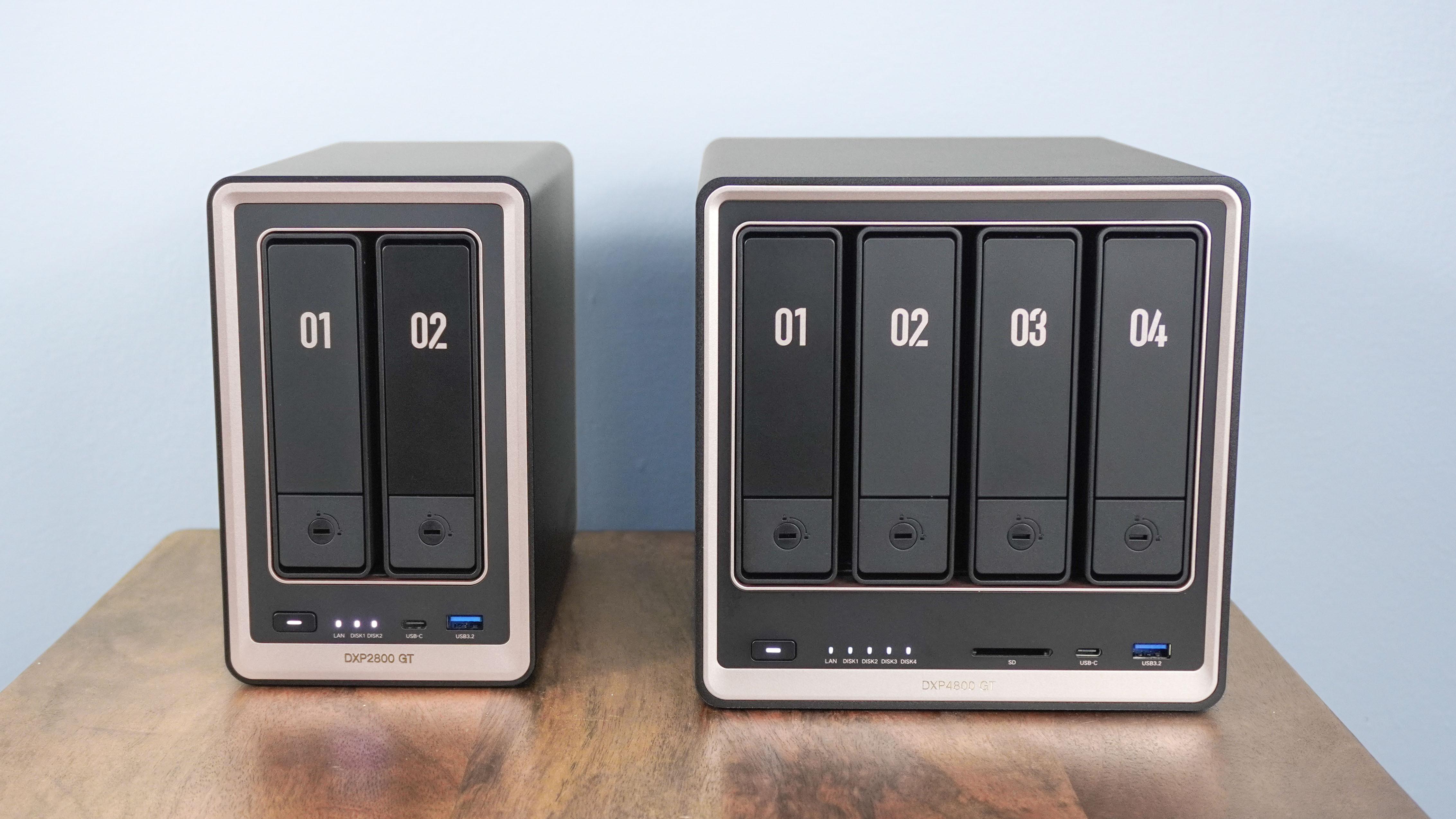
At 9.1 x 4.3 x 7 inches, Ugreen’s DXP2800 GT is the smaller of its two new AMD-powered NAS devices. Given its smaller, two-bay form factor, this NAS is much more compact and can be used on your desk or tucked away on a shelf near your router.
By comparison, the DXP4800 GT is slightly larger at 10.1 x 7 x 7 inches. Its extra width accommodates two additional drive bays, bringing the total to four. At the same time, you also get an SD card reader on the front.
Unlike Ugreen’s first globally available NAS devices — the DXP2800 and DXP4800 — which were powered by Intel chips and featured a dark aluminum finish with matte black accents, the company has switched things up with the GT series. These new models are black with rose gold accents, which in my opinion gives them more of a premium look overall. They stand out a bit more too, but in a good way.
Ugreen DXP2800 GT vs DXP4800 GT: Ports and networking
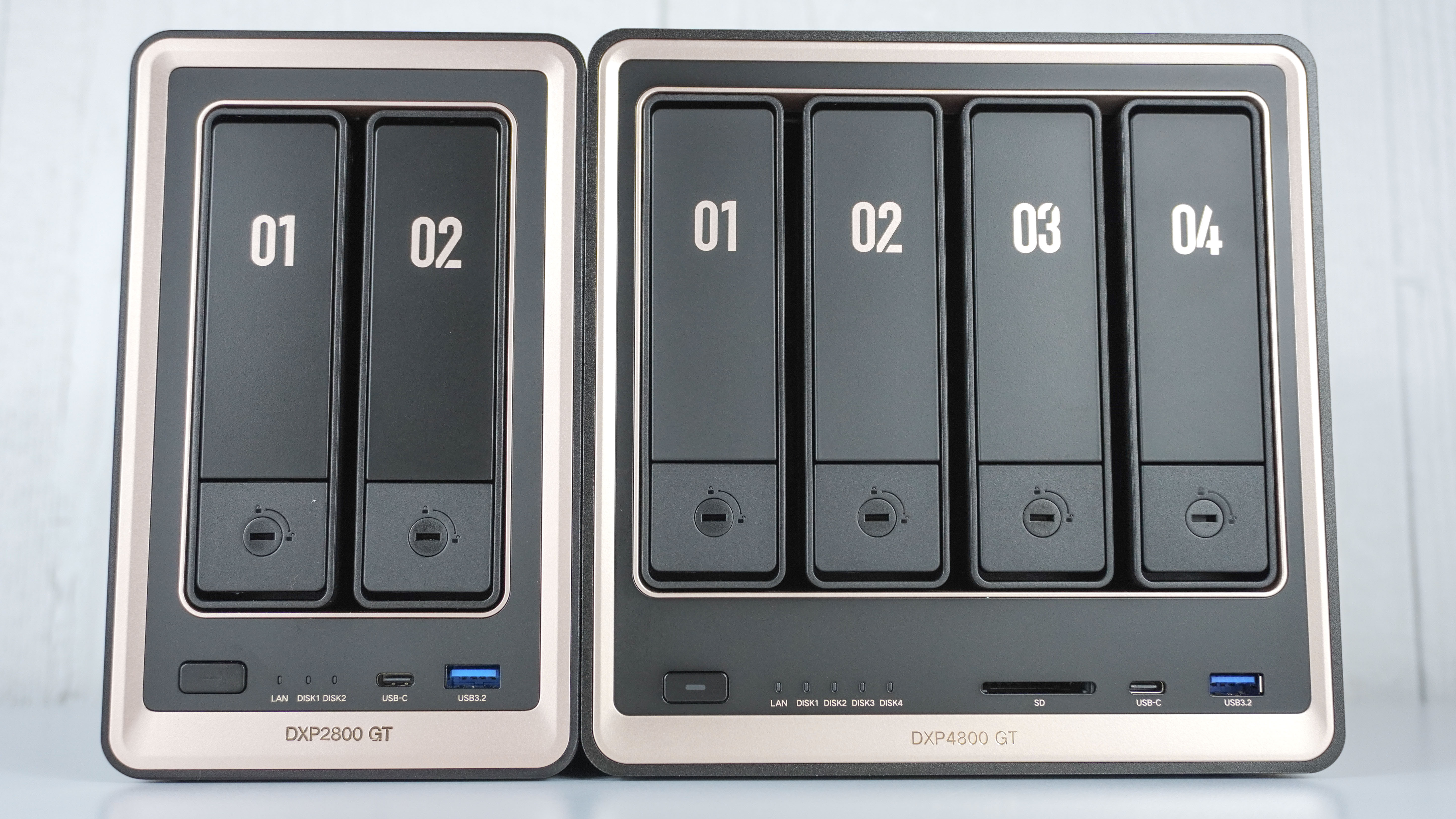
Regardless of which device you choose, you’re getting a high-speed 10Gbps USB-C port and a 10Gbps USB-A port on the front panel. You can use these to quickly offload data from flash drives and external hard drives directly onto your NAS — and on the DXP4800 GT, you can do so via an SD card reader, too.
Next to those front ports, status LEDs keep you informed on drive activity alongside a LAN indicator to show network connectivity. Below these sits the power button, complete with its own central LED light.
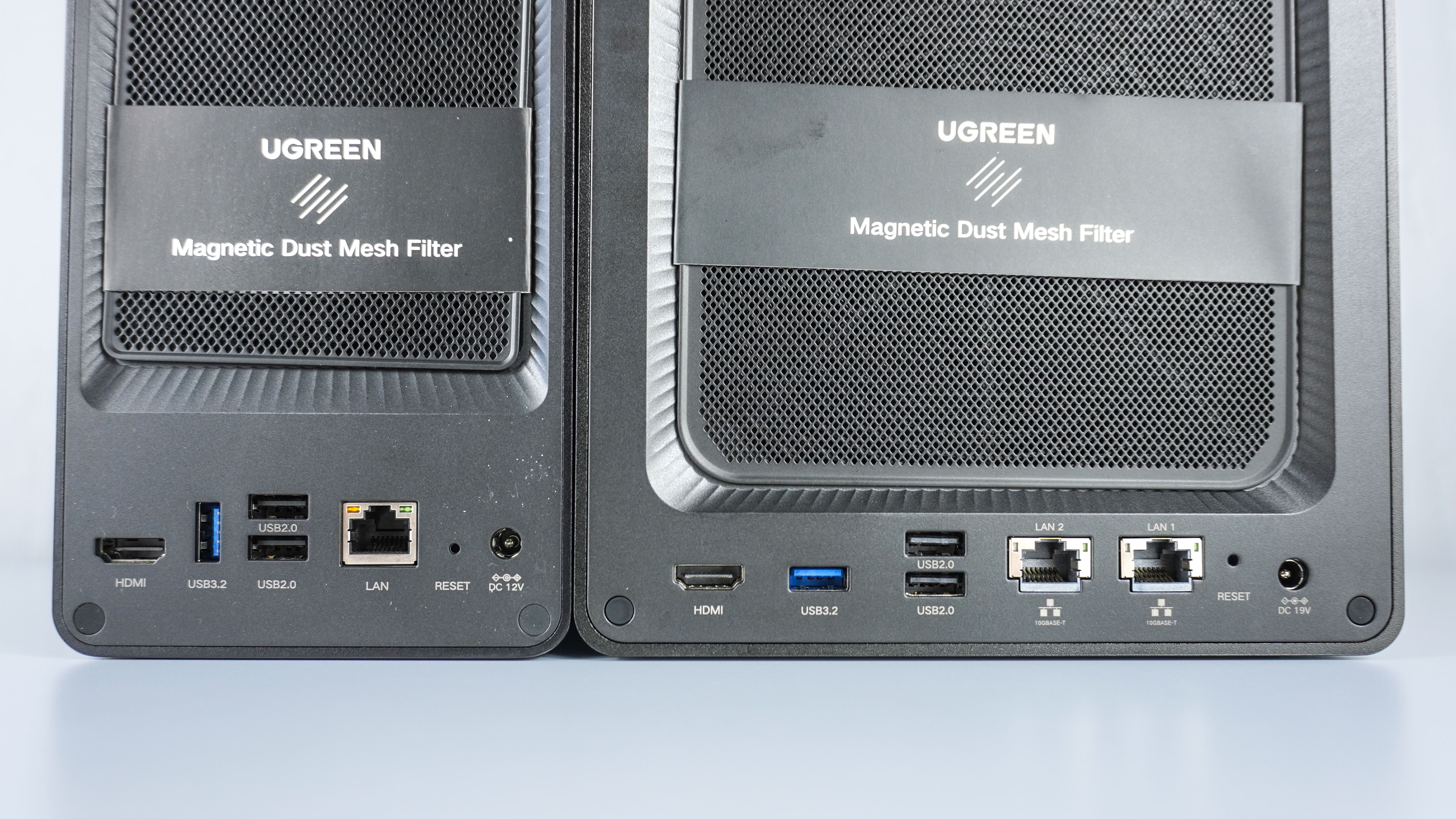
Around back is where things get a bit more interesting. Both the DXP2800 GT and DXP4800 GT feature an HDMI 2.0 port, a high-speed USB 3.2 Type-A port, two USB 2.0 Type-A ports, a 10 Gigabit Ethernet port, a reset button, and a barrel DC power connector. With the DXP4800 GT, however, you get an additional 10 GbE port — bringing total networking up to dual 10GbE.
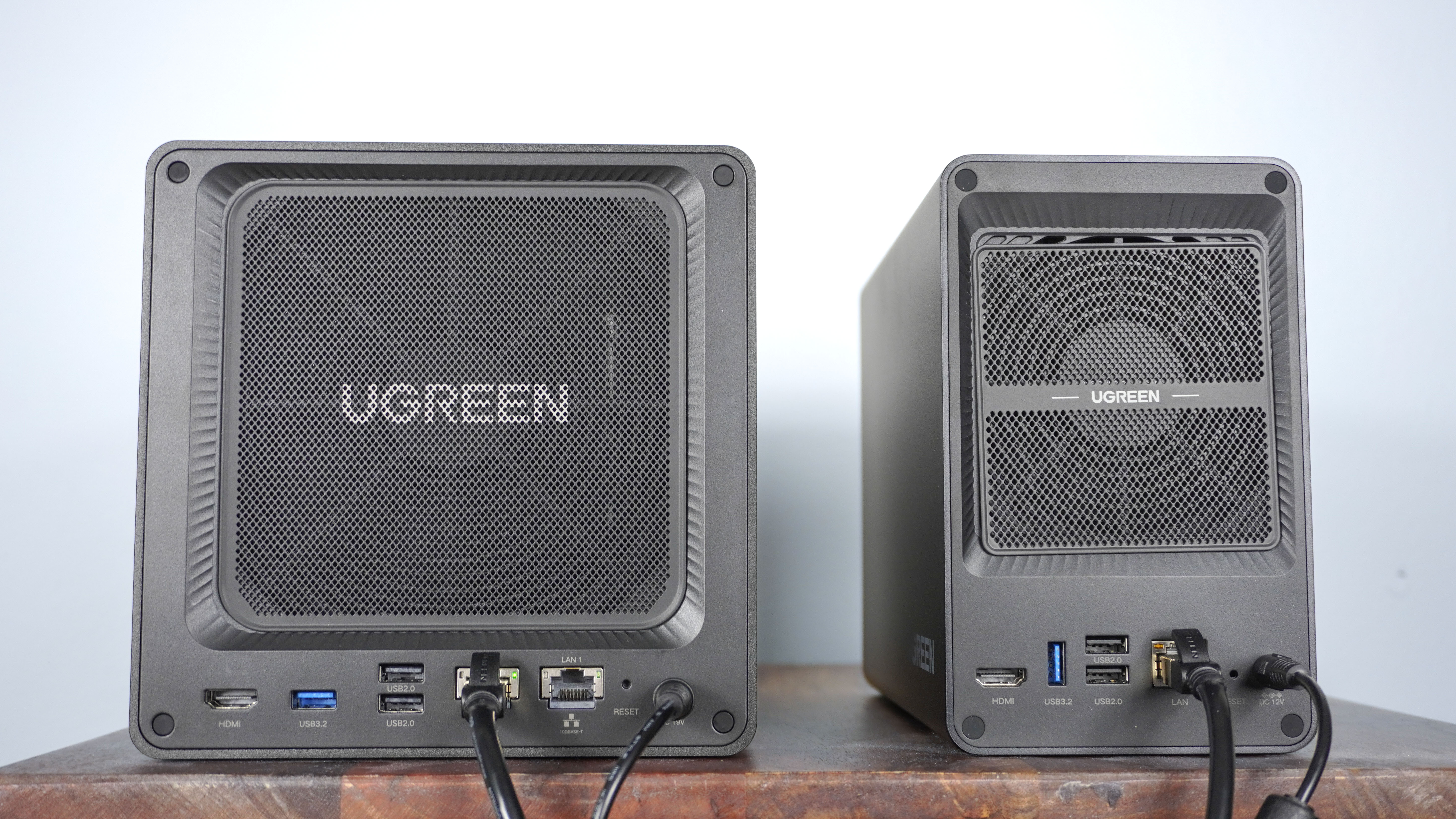
Having that second 10 GbE port gives you a lot more flexibility when it comes to setting up and using the DXP4800 GT. You can combine both ports through link aggregation to double your potential bandwidth to 20 Gbps. This can be particularly useful if you have multiple people using this NAS at the same time to do things like edit 4K video.
Alternatively, you can use it to connect the DXP4800 GT to your main PC for blazing-fast file transfers while keeping the second port connected to one of the best Wi-Fi routers so you can access the NAS from the rest of your home network.
Ugreen DXP2800 GT vs DXP4800 GT: Storage
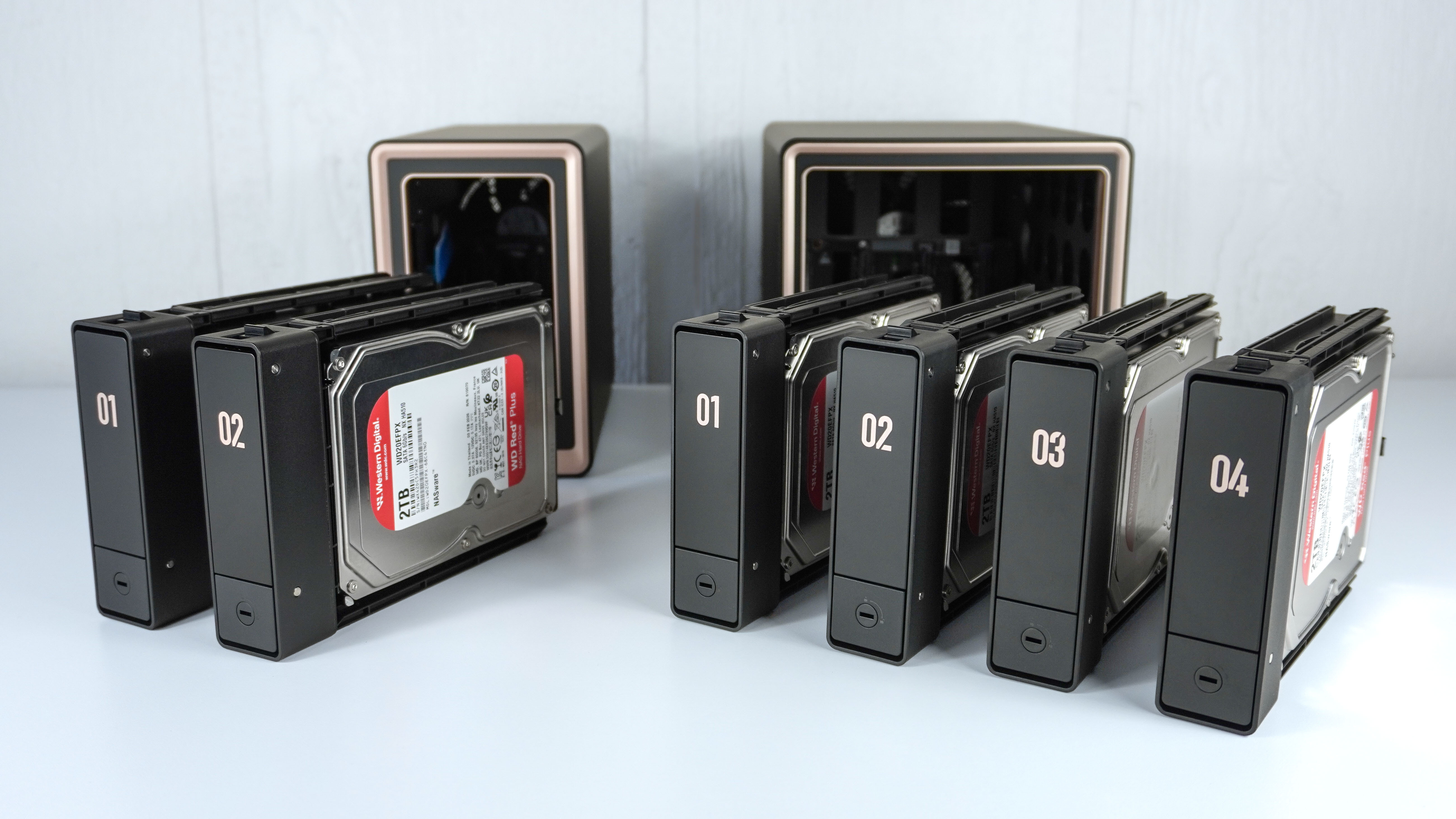
With two drive bays, you can load up the DXP2800 GT with up to two 32TB hard drives (HDDs). Both standard 3.5-inch SATA HDDs and 2.5-inch SATA HDDs or SSDs are compatible with both models. On the DXP4800 GT, which features four bays instead of two, you can install up to four 32TB HDDs.
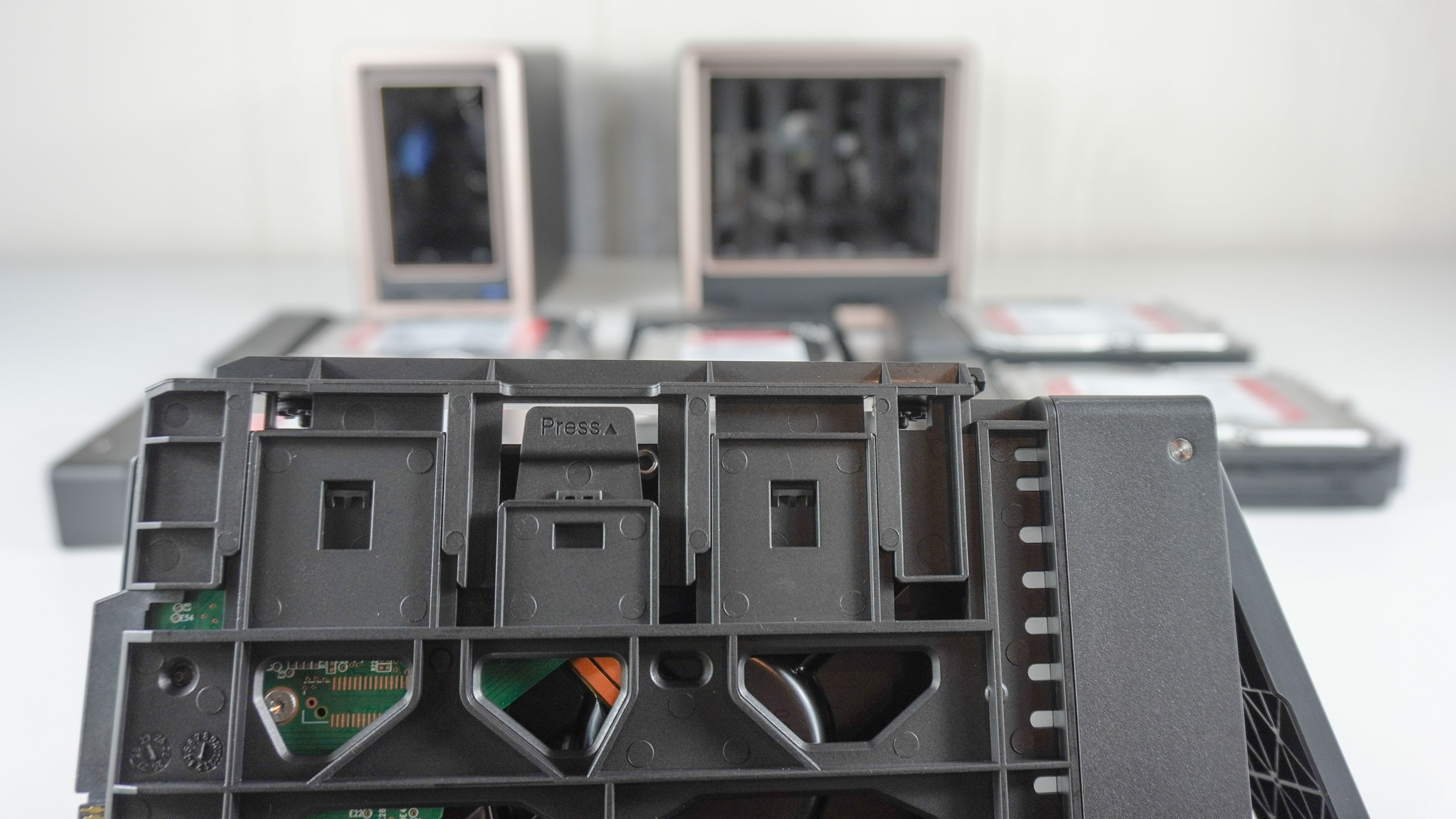
When using standard hard drives, these bays are completely toolless. To install a drive, you press down on the release tab, insert your drive, and snap the side retention rails into place. The whole process is simple, making initial setup or hot-swapping drives effortless.
If you’re using 2.5-inch HDDs or SSDs, these drives secure to the bottom of the tray using the included mounting screws. I installed several drives this way when I set up the Ugreen DH4300 Plus, and while it took slightly longer, the whole process was fairly simple.
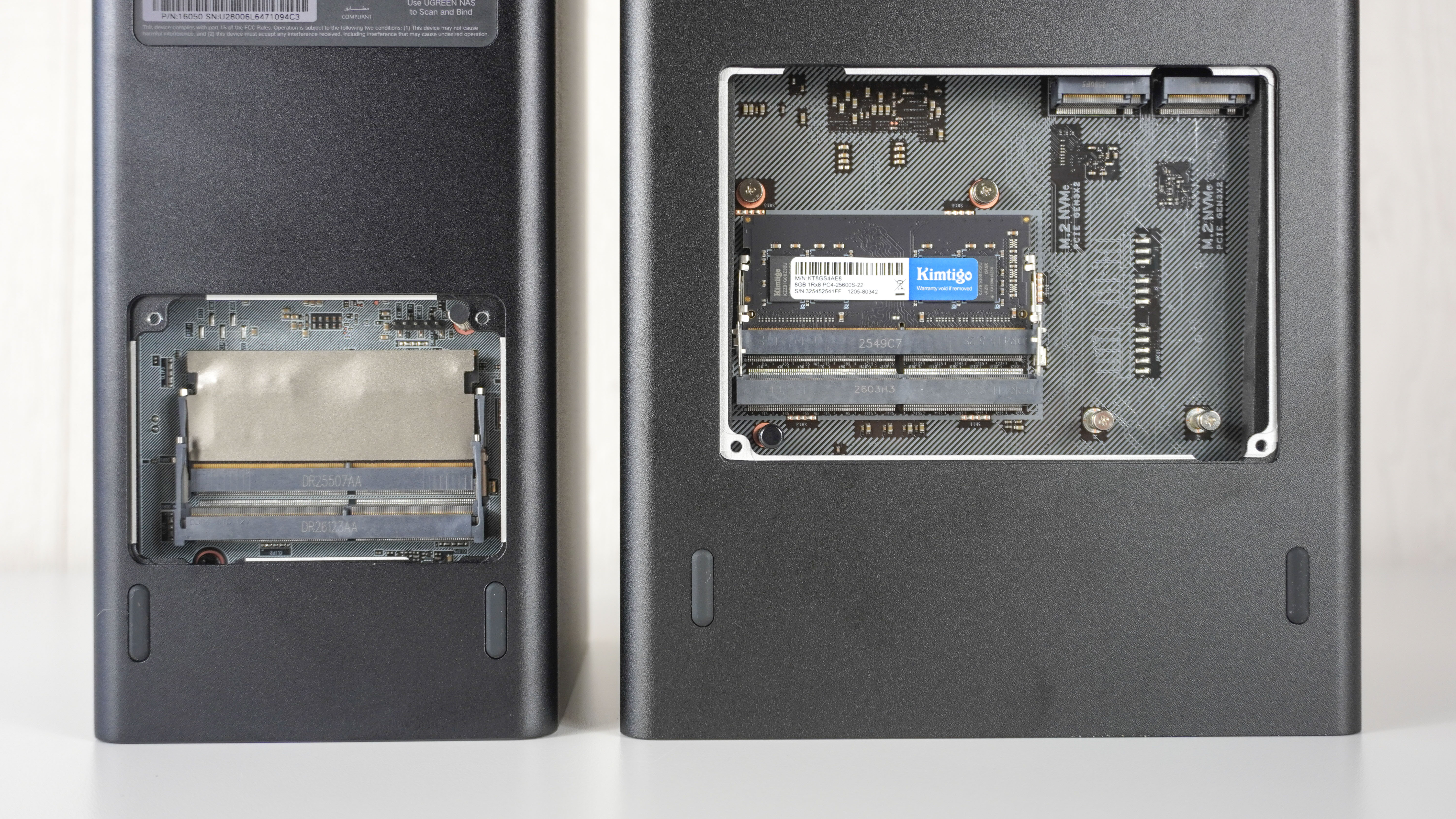
Underneath both NAS units, an access panel provides access to internal upgrades. Both models come with 8GB of DDR4 RAM pre-installed and feature two SO-DIMM slots, allowing you to expand their memory up to 64GB.
For basic file storage and media streaming, the stock 8GB of RAM is more than enough. However, if you plan to run multiple Docker containers, host virtual machines, or manage a large media library with heavy indexing, upgrading their memory becomes essential. You can leave the original stick in place and add a second 8GB module to reach 16GB, or swap out the pre-installed memory for two 16GB modules (32GB total) or use dual 32GB modules to max out the hardware at 64GB.
When it comes to high-speed solid-state storage, both units feature two M.2 NVMe slots supporting up to 8TB per drive (16TB total via M.2). On the DXP4800 GT, these slots sit directly next to the RAM under the bottom panel for easy access. On the DXP2800 GT, the M.2 slots are mounted on the inner left wall inside the chassis, requiring you to pull out the main drive bays to access them.
With all front drive bays and both M.2 slots populated at max capacity, the DXP2800 GT tops out at 80TB of total raw storage, while the DXP4800 GT reaches a massive 144TB.
Ugreen DXP2800 GT vs DXP4800 GT: RAID
How you configure your NAS’s storage in UGOS Pro depends heavily on which enclosure you choose, as your available RAID options and fault tolerance are dictated entirely by drive bay count.
With the two-bay DXP2800 GT, you can choose between Basic, JBOD, RAID 0, and RAID 1:
- RAID 1 (Recommended): Mirrors your data across both drives. If one drive fails, your data remains completely intact. The trade-off is usable capacity, as mirroring cuts your total storage in half.
- RAID 0 / JBOD: Combines both drives into a single volume for maximum available capacity and speed. However, neither mode offers data redundancy; if a single drive fails, you lose all your data.
Thanks to its four-bay design, the DXP4800 GT unlocks additional RAID options, including RAID 5, RAID 6, and RAID 10:
- RAID 5: Yields the full usable capacity of three drives while allowing your data to survive a single drive failure — offering the best sweet spot between storage efficiency, protection, and performance.
- RAID 6: Uses double-parity across all four drives, allowing your array to survive two simultaneous drive failures.
- RAID 10: Combines striping and mirroring across four drives. You lose 50% of your total usable capacity, but gain top-tier read/write speeds and significantly faster array rebuild times.
If all these technical configurations feel overwhelming, don't worry. During initial setup, UGOS Pro walks you through each option with clear visual explanations and recommends the best setup based on your specific storage needs and workflow.
Ugreen DXP2800 GT vs DXP4800 GT: Power and noise
Although NAS energy consumption depends heavily on drive access and workload, Ugreen rates the two-bay DXP2800 GT at around 16.4W during active drive access, dropping down to 4.2W when its drives are hibernating. Meanwhile, the four-bay DXP4800 GT draws roughly 35.2W under active use and 15.4W while idle.
When it comes to noise levels, I used a dedicated sound level meter to see just how loud the two enclosures were. With both sitting idle, the DXP2800 GT operated at a whisper-quiet 32.3 dB while the DXP4800 GT was slightly louder at 39.0 dB.
To put this into context, the DXP2800 GT is about as quiet as a bedroom at night or leaves rustling in a light breeze. It’s barely noticeable in a room on its own or even sitting directly on your desk — operating at a noise floor similar to a Mac mini M4.
The DXP4800 GT sounds closer to a low refrigerator hum in the background. It’s slightly more noticeable, but with its front-facing SD card reader, creative professionals will likely want it within arm's reach anyway for quick photo and video offloads from their camera.
Ugreen DXP2800 GT vs DXP4800 GT: Which should you buy?
Considering whether Ugreen’s DXP2800 GT or DXP4800 GT is right for you comes down to your workflow, where you plan to set either device up, and how much storage you really need. At the end of the day, both deliver an impressive step up for power users with AMD Ryzen Embedded horsepower, dual M.2 NVMe slots, and ultra-fast 10 Gigabit networking.
With its smaller footprint and lower noise floor, the DXP2800 GT is an excellent “desk companion” NAS. It works just as well tucked away on a shelf or sitting right next to your monitor in a home office or bedroom. With support for up to 80TB of raw capacity, it provides more than enough storage for a solo editor working with large video files or managing heavy local backups. However, with only two drive bays, your RAID options are inherently limited — especially if you want to maintain disk redundancy without sacrificing half your raw capacity to drive mirroring.
The DXP4800 GT offers greater overall storage capacity, additional connectivity, and — thanks to its four-bay design — much more flexible RAID configurations like RAID 5 or RAID 6. The front-facing SD card reader is a huge quality-of-life upgrade for photographers and videographers, while the dual 10GbE ports let you connect directly to an editing workstation and your local network simultaneously. Alternatively, you can aggregate both Ethernet ports for even higher multi-user bandwidth. On top of supporting up to 144TB of raw capacity, its bottom panel makes accessing and upgrading its M.2 NVMe slots significantly easier.
If you want an ultra-quiet, compact enclosure that delivers 10GbE performance on a single desk, the DXP2800 GT is one of the best two-bay NAS units you can buy. But if you need room for massive storage expansion, advanced RAID protection, dual 10GbE networking, and the convenience of a built-in SD card reader, spending the extra money for the DXP4800 GT is the way to go.
More from Tom’s Guide
This is a preview from the original publisher. Continue reading at the source:
Read Full Article on tomsguide.com →